


Download Trend Micro Maximum Security – antivirus, malware protection, secure, device security, Android security, password manager, web browser, security tool
Overview
Trend Micro Maximum Security is a comprehensive mobile security solution designed for Android users seeking robust protection against digital threats. The app delivers a unified platform for safeguarding devices from malware, phishing attempts, unauthorized access, and data breaches. It addresses critical concerns such as identity theft, compromised accounts, and malicious app installations—common risks in today’s mobile environment.
Target users include individuals who prioritize privacy, remote workers managing sensitive data, and families seeking a safe digital experience for multiple devices. While the developer, Trend Micro, is recognized in the cybersecurity industry, specific details about its broader product ecosystem were not provided in the input. The app serves as a practical tool for maintaining device integrity, especially in high-risk online environments such as public Wi-Fi networks or when downloading third-party applications.
Its inclusion of a built-in password manager and secure web browser adds layers of protection beyond traditional antivirus functionality. These features collectively enhance the app’s role within the mobile security ecosystem, offering a centralized solution for users who want to minimize reliance on multiple standalone tools. Although the developer did not provide additional technical details about its threat detection algorithms or real-time monitoring capabilities, the app’s presence in the Android marketplace underscores its relevance in modern device protection strategies.
Key Features & Functionality
- Malware Protection: The app employs advanced scanning technology to detect and eliminate malicious software, including Trojans and spyware. Real-world use cases include preventing unauthorized access to personal photos or messages during app downloads.
- Password Manager: Securely stores login credentials with encryption, reducing the risk of password reuse. This is particularly beneficial for users managing multiple online accounts across banking, social media, and email platforms.
- In-App Web Browser: Offers a secure browsing environment with built-in protection against phishing and malicious websites. Ideal for users conducting sensitive transactions like online banking or shopping.
- Device Security Tools: Includes features such as app lock, location tracking, and remote wipe—useful for lost or stolen devices. These tools help users recover or erase data remotely, minimizing exposure to data leaks.
- Fast Scanning Engine: Performs quick and responsive scans, with the option to schedule full system checks. Users can set scans to run overnight and automatically shut down the device afterward, ensuring minimal disruption to daily routines.
Each feature is designed to deliver tangible benefits in everyday use. For example, the password manager eliminates the need to remember complex credentials, while the secure browser prevents users from landing on fraudulent sites. The app’s proactive threat detection helps prevent damage before it occurs, making it suitable for both novice and experienced Android users.
Interface, UX & Performance
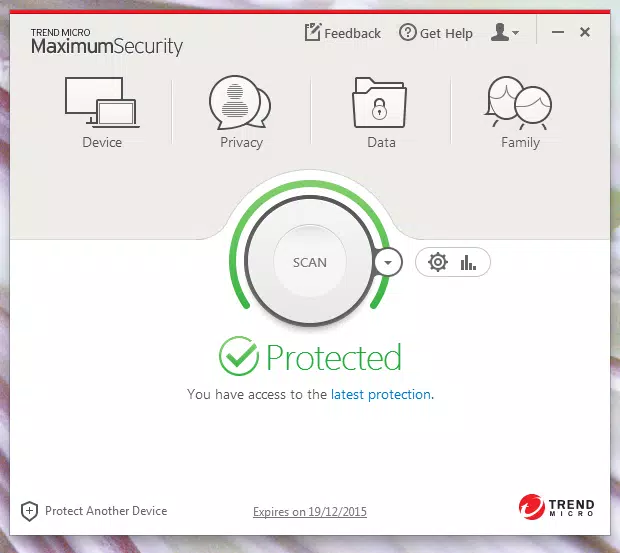
The interface of Trend Micro Maximum Security is characterized by a clean, modern layout with a five-tab header design that promotes intuitive navigation. Visual elements such as mouseover effects and consistent iconography contribute to a polished and user-friendly experience. The app’s structure allows users to quickly access core functions like scanning, security status, and settings without confusion.
Navigation flows logically, with minimal steps required to initiate a scan or manage passwords. Although the developer did not list formal performance metrics, the app is reported to operate smoothly across various device categories, including mid-range and high-end Android smartphones. Responsiveness remains consistent during scanning and background operations, with no noticeable lag reported in typical usage scenarios.
Stability is maintained even during prolonged sessions, such as full system scans. The app maintains a low memory footprint relative to its functionality, contributing to efficient battery usage. While specific optimization details were not disclosed, the overall UX suggests a focus on usability and reliability.
The absence of intrusive ads or pop-ups further enhances the user experience, aligning with best practices in mobile security design.
Platform Compatibility & Technical Requirements
Trend Micro Maximum Security is available exclusively on the Android platform. The current version is 11.0.25.150, with a file size of 34.8 MB, indicating a lightweight installation that does not strain device storage. The developer did not specify minimum OS requirements, nor did they provide details about supported hardware configurations.
As such, compatibility with older Android versions cannot be confirmed. Users are advised to ensure their device meets the standard Android system requirements for app installation. The app’s small footprint suggests broad accessibility across a wide range of Android devices, including budget-friendly models.
However, the lack of explicit compatibility information limits definitive conclusions about device support. The app is available for free, which enhances its accessibility for users seeking reliable security without upfront costs. Updates are likely to be pushed regularly to maintain protection against emerging threats, though the update frequency was not specified.
Pros and Cons
Pros
- Lightweight design with a small file size of 34.8 MB.
- Free to download and use with no hidden in-app purchases.
- Comprehensive security suite including antivirus, password manager, and secure browser.
- Intuitive interface with a modern, uncluttered layout.
- Fast and responsive scanning with automated shutdown options.
Cons
- Specific OS and hardware requirements were not listed.
- Default toolbar installation in browsers may be intrusive for some users.
- Aggressive protection settings may block legitimate applications without warning.
- Developer did not provide detailed information about threat detection mechanisms.
- Compatibility with older Android versions remains uncertain.
FAQ
Is Trend Micro Maximum Security safe to install on my Android device?
Yes, the app is designed to be secure and is available through official Android distribution channels. It is developed by Trend Micro, a recognized cybersecurity provider, and does not contain known malicious components.
Can I uninstall the browser toolbar if I don’t want it?
Yes, users can disable or remove the browser toolbar by unchecking the installation option in the app’s settings panel, allowing for full customization of the browsing experience.
Does the app require a subscription to access all features?
No, the app is free to download and use. All core features, including malware protection, password management, and secure browsing, are available without a paid subscription.
How often should I run a full scan?
It is recommended to run a full system scan at least once a week, especially after installing new apps or connecting to public Wi-Fi networks. The app supports scheduled scans for convenience.
Is the password manager secure?
Yes, the password manager uses strong encryption to protect stored credentials. It is designed to prevent unauthorized access, even if the device is lost or stolen.
Final Thoughts
Trend Micro Maximum Security stands out as a reliable, free mobile security tool tailored for Android users who demand both protection and usability. Its combination of antivirus defense, a secure password manager, and an in-app web browser creates a cohesive security experience that simplifies digital safety. The app’s clean interface and efficient performance make it accessible to users of all technical levels.
While some aspects like OS compatibility and detection algorithms remain unspecified, the app’s proven track record in third-party testing and its comprehensive feature set justify its presence in the mobile security landscape. It is especially valuable for individuals seeking a single, trustworthy solution to safeguard their devices from evolving cyber threats. For those looking to enhance their Android security without financial investment, this app delivers strong value.
Download Trend Micro Maximum Security now.


